Process Model vs Process Instance vs Process Scenario: What’s the Difference?
28-09-2026
15 min
A Process Model describes how a Process works. A Process Instance is one particular execution, with its own data and progress. A Process Scenario describes one possible way the Process can run from start to end.
These concepts are closely related, which makes them easy to confuse. If two customer requests follow exactly the same steps, are they the same Instance, the same Scenario, or both? Using a simple product return example, this article explains the differences and shows how to recognize each concept when reading a BPMN diagram.
Key Takeaways
- A Process Model describes how a Process works, including its Activities and possible alternative paths.
- A Process Instance is one particular execution of the Process, with its own data and progress.
- A Process Scenario describes one possible way a Process can run from start to end.
- Several Process Instances can follow the same Scenario without becoming the same Instance.
- Loops and parallel work can occur within a single Process Instance.
Introduction
Imagine that two customers submit return requests. Both requests are assessed, both are eligible, and both follow exactly the same steps.
We have one shared description of how returns are handled, two separate executions, and one illustrated way through the Process.
These are different perspectives:
- The Process Model describes the shared behavior.
- The Process Instances represent the individual executions.
- The Process Scenario describes the path followed by both executions.
To explain the distinction, we will reuse the product return example from BPMN vs DMN: Key Differences and How to Use Them Together.
1. The Process Model: How Does the Process Work?
A Process Model represents how a Process works. It describes the relevant Activities, Events, and flows, including alternative behavior.
Consider our simplified return Process:
A return request is received, and the company assesses its eligibility. If the result is Eligible, the company continues with the handling of the authorized return. If the result is Not Eligible, the company informs the customer of rejection. The Process then ends.
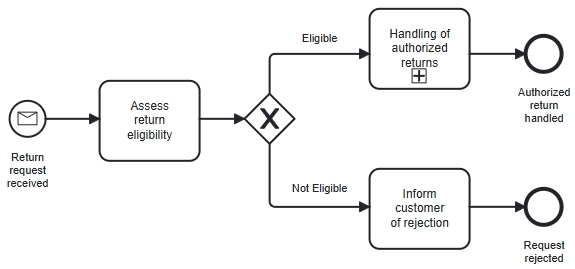 Figure 1: One Process Model describes both eligible and ineligible return handling.
The model includes both alternatives because it describes behavior that can apply to many requests.
The model does not describe one particular customer’s return request. It provides a shared description that can be used to handle many different requests.
The diagram is a graphical representation of that model. Highlighting one path does not create a new Process Model.
Why This Matters
When reviewing a Process Model, ask: Does this model describe the behavior we need?
For example, does it show what happens when a request is eligible? Does it also show what happens when the request is rejected? These questions concern the modeled behavior, rather than a particular customer’s request.
2. The Process Instance: One Particular Execution
A Process Instance is one particular execution of a Process, with its own data and progress. For our example, assume that each new return request starts a separate Process Instance.
- Anna submits request R-1042. Handling that request is one Instance.
- David submits request R-1043. Handling his request is another Instance.
Both requests may pass through exactly the same Activities, but they remain separate executions.
Now consider three requests:
| Process Instance | Customer | Eligibility Result |
|---|---|---|
| R-1042 | Anna | Eligible |
| R-1043 | David | Eligible |
| R-1044 | Maria | Not Eligible |
There is still only one Process Model, but there are three Process Instances.
The number of Instances comes from the separate executions, not from the number of paths in the diagram.
Each Instance Has Its Own Data
The model describes the information needed to handle a request. Each Instance has its own values for that information.
For example:
- The customer submitting the request.
- The product being returned.
- The number of days since delivery.
- Whether the product belongs to a returnable category.
- Whether the product is unopened.
- The eligibility result.
Anna’s and David’s requests can produce the same eligibility result without sharing the same data.
Each Instance Has Its Own Progress
Instances do not need to move through the Process together.
If we looked at these requests before all three were completed, we might see the following:
- Anna’s request may be inside Handling of authorized returns.
- David’s request may still be at Assess return eligibility.
- Maria’s request may already have reached Request rejected.
The same model supports all three executions.
An Instance does not need to be completed to count as an Instance. A request still being assessed is already part of an active Process Instance.
Why This Matters
When discussing a particular problem, ask: Which Process Instance are we talking about?
“The return Process is waiting” is ambiguous.
“Return request R-1042 is waiting for the product to arrive” identifies the particular case and its situation.
3. The Process Scenario: One Possible Way From Start to End
For this article, we use the following definition: A Process Scenario describes one possible way a Process can run from start to end.
This is a practical definition for explaining and testing behavior. BPMN does not define a separate element called a Process Scenario.
For a simple Process with alternative paths, a Scenario can be understood as one possible path from a Start Event to an End Event, under particular conditions.
Our return model illustrates two main Scenarios at the level shown.
Scenario 1: Eligible Return
A return request is received. The company performs Assess return eligibility, and the result is Eligible.
The Process follows the Eligible Sequence Flow and enters Handling of authorized returns. When that work finishes, it reaches Authorized return handled.
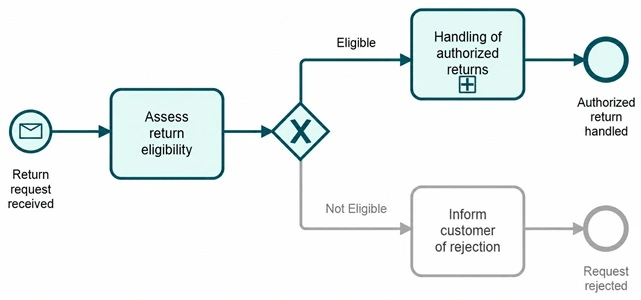 Figure 2: The eligible return Scenario follows the path through Handling of authorized returns.
As explained in the companion article, eligibility authorizes the return to proceed. It does not automatically guarantee a refund. Receiving the product, inspecting it, and issuing a refund when appropriate belong to the later handling work.
Scenario 2: Ineligible Return
A return request is received. The company performs Assess return eligibility, and the result is Not Eligible.
The Process follows the Not Eligible Sequence Flow, performs Inform customer of rejection, and reaches Request rejected.
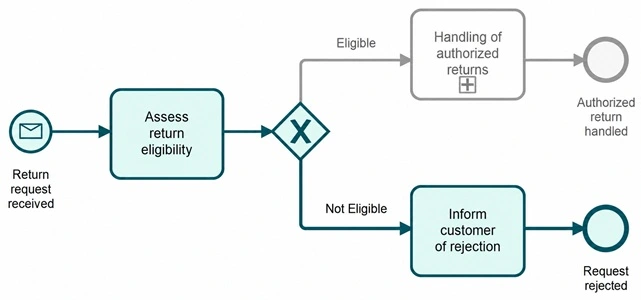 Figure 3: The ineligible return Scenario follows the path through Inform customer of rejection.
These are two possible ways through the same Process Model.
Different Instances Can Follow the Same Scenario
We can now connect the Scenarios to our three requests:
| Process Instance | Customer | Eligibility Result | Scenario Followed |
|---|---|---|---|
| R-1042 | Anna | Eligible | Eligible return |
| R-1043 | David | Eligible | Eligible return |
| R-1044 | Maria | Not Eligible | Ineligible return |
Anna’s and David’s requests follow the same Scenario, but they remain separate Instances.
We have one Process Model, three Process Instances, and two illustrated Scenarios.
Why This Matters
Scenarios help us test whether a model behaves as expected. We can take a concrete situation, identify the relevant conditions, and follow the model from start to end.
For example: The customer submits a request 42 days after delivery. Under the simplified 30-day policy, which path should the Process follow?
This connects the business situation to the behavior represented in the model.
Process Model vs Process Instance vs Process Scenario: Quick Comparison
| Concept | What It Describes | Question It Answers | Return Example |
|---|---|---|---|
| Process Model | The shared description of Process behavior. | How does the Process work? | The model containing eligible and ineligible paths. |
| Process Instance | One particular execution with its own data and progress. | Which execution are we discussing? | Handling Maria’s request R-1044. |
| Process Scenario | One possible way the Process can run from start to end. | What could happen in this situation? | A request is found ineligible and rejected. |
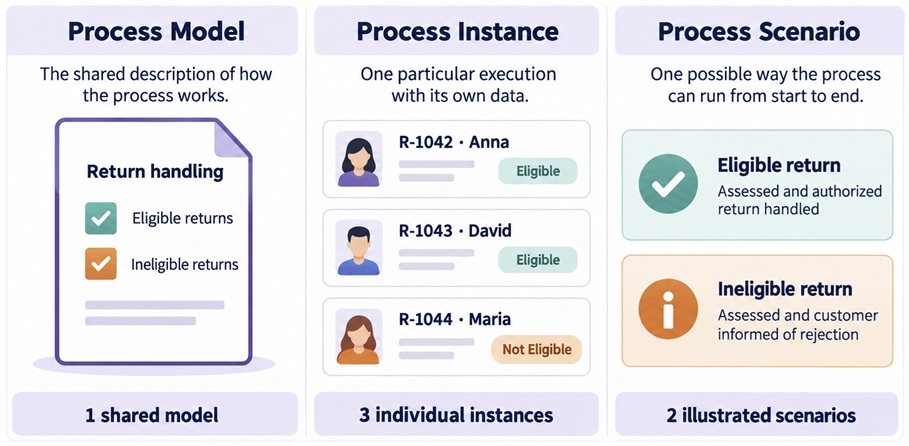 Figure 4: Process Model vs Process Instance vs Process Scenario
Two customers can follow the same Scenario while remaining separate Process Instances. Likewise, showing two highlighted Scenarios does not mean that we have created two Process Models.
Common Misconceptions
“Every Path Is a Separate Process Instance”
A path describes possible behavior. It does not identify a particular execution. The eligible path might be followed by hundreds of Instances. Each request remains a separate case.
“A Process Instance Must Be Completed”
An Instance exists while the Process is running. A request being assessed is part of an active Instance. A request whose processing has finished belongs to a completed Instance.
“Repeating a Task Creates a New Process Instance”
Suppose we extend the model with a clarification loop. The company asks the customer for missing information. The customer provides it, and Assess return eligibility is performed again.
That repeated assessment can happen within the same Process Instance. The company is still handling the same request.
The Task is performed again, but the Process has not necessarily started again.
“Parallel Branches Mean Separate Process Instances”
Suppose the handling work includes two Activities that can happen independently: arranging collection and sending return instructions.
A Parallel Gateway can activate both branches within the same Process Instance. Both branches concern the same return request.
This also explains a limitation of the phrase “one path from start to end.” When parallel work is involved, a Scenario includes the relevant branches, rather than just one line through the diagram.
The broader wording remains useful: One possible way a Process can run from start to end.
“Every Model Has a Small, Fixed Number of Scenarios”
Our simplified diagram illustrates two main alternatives.
However, Handling of authorized returns is a collapsed Sub-Process. Expanding it could reveal additional alternatives. Loops could also introduce different numbers of repetitions.
The number of Scenarios we describe therefore depends on the behavior and level of detail we are considering.
Certification Corner: Check Your Understanding
A company uses the return Process Model shown in Figure 1.
Five customers submit separate return requests:
- Three requests are found eligible, and their authorized return handling is completed.
- Two requests are found ineligible, and the customers are informed of rejection.
All five Process Instances have finished.
At the level shown in Figure 1, how many Process Models, Process Instances, and illustrated Process Scenarios are involved?
Answer and Explanation
| Concept | Number | Explanation |
|---|---|---|
| Process Models | 1 | All requests use the same modeled behavior. |
| Process Instances | 5 | Each request starts a separate execution. |
| Illustrated Process Scenarios | 2 | Eligible return and ineligible return. |
The three eligible requests do not become one Instance simply because they follow the same Scenario.
Likewise, the rejected requests do not require a separate Process Model. Their behavior is already included in the shared model.
Frequently Asked Questions
What Is the Difference Between a Process Model and a Process Instance?
A Process Model describes how a Process works. A Process Instance is one particular execution of that Process.
The return model can be used for many requests. Handling each separate request creates an Instance in our example.
Is a Process Instance the Same as a Process Scenario?
No. An Instance is one particular execution with its own data and progress. A Scenario describes a possible way the Process can run from start to end.
Can Several Process Instances Follow the Same Scenario?
Yes. Many return requests can follow the eligible return Scenario while remaining separate Instances.
Does Every Instance Perform Every Activity in the Model?
No. Alternative paths allow Instances to perform different Activities.
In our example, a request following the eligible path does not perform Inform customer of rejection.
Does a New Customer Always Mean a New Process Instance?
No. The relationship depends on what the Process represents.
In our example, each return request starts an Instance. One customer could submit two separate requests and therefore be associated with two Instances.
Why This Matters
The distinction helps teams discuss models and actual work more precisely.
- When reviewing a Process Model, we check whether the required behavior is represented.
- When investigating a Process Instance, we examine what happened, or is happening, in one specific execution.
- When testing a Process Scenario, we check how the model handles a particular situation.
For your next model review, choose two cases that follow the same Scenario and one that follows a different Scenario. Give each case an identifier and walk through the diagram.
That simple exercise helps separate the shared model, the individual executions, and the possible ways through the Process.
Why Trust This Article?
I am Filip Stachecki, a consultant and trainer with more than 20 years of experience in software engineering, business analysis, and professional education. Since 2013, I have contributed to OMG certification programs, including defining exam scopes and co-authoring official OCEB 2, OCUP 2, and BPMN exam questions.
The explanations of Process execution, Instances, loops, and parallel behavior are grounded in the OMG BPMN specification. Process Scenario is explicitly introduced as a teaching term rather than a formal BPMN definition.
The return example and practice exercise are designed to explain these distinctions in clear language.
About eduMAX
eduMAX is an OMG Accredited Training Provider offering training and certification preparation in modeling.
My materials focus on understanding how to apply modeling concepts, supported by practical examples and clear explanations.
Explore eduMAX training and practice materials or read more articles on the eduMAX blog.
Specification References
- OMG BPMN 2.0.2: Chapter 10, Processes, and Chapter 13, BPMN Execution Semantics.