BPMN vs DMN: Key Differences and How to Use Them Together
25-09-2026
11 min
BPMN describes how work moves through a process. DMN describes how a decision is made from the information available. Used together, they help you show both what happens and which rules determine the outcome.
Consider a customer returning an online purchase. The company needs a process for receiving the request, handling the returned product, and issuing a refund. It also needs rules for deciding whether the return is eligible. These are closely related modeling problems, but they deserve different explanations.
In this article, we will model that example step by step. You will see when BPMN is sufficient, what a DMN Decision Table adds, and how the two models work together.
Key Takeaways
- BPMN models the flow of work, including Activities, Events, and alternative paths.
- DMN models Decisions, their Information Requirements, and the logic used to determine results.
- Simple routing conditions can remain in BPMN. You do not need a separate DMN model for every Gateway.
- A Decision Table can make combinations of business rules easier to review and change.
- A BPMN process can evaluate a DMN Decision and use its result to determine the next step.
- Correct decision logic still needs suitable Input Data, testing, and a clear business policy.
BPMN vs DMN at a Glance
Business Process Model and Notation (BPMN) and Decision Model and Notation (DMN) are complementary standards maintained by the Object Management Group (OMG). They can be used together or independently.
| Area | BPMN | DMN |
|---|---|---|
| Main focus | The Process and its flow of work | Decisions and their logic |
| Typical question | What happens next? | What result follows from these facts? |
| Common elements | Tasks, Events, Gateways, Sequence Flows | Decisions, Input Data, Decision Tables |
| Return example | Receive a return and issue a refund | Determine whether the return is eligible |
| Useful representation | A Process or Collaboration Diagram | A Decision Requirements Diagram and decision logic |
The distinction becomes useful when the workflow is relatively stable but its business rules change. A retailer may continue receiving and refunding returns in the same way while changing the eligibility policy.
DMN is broader than Decision Tables. A Decision Requirements Diagram shows the information and other Decisions needed by a Decision. The detailed logic can use Decision Tables or other expressions. Here, we will focus on one Decision and one Decision Table.
Specification reference: OMG DMN 1.5, Clauses 6-8.
A Product Return Example
Imagine a fictional online retailer with a voluntary return policy. We will use simplified company rules for teaching, rather than attempt to describe consumer rights or every possible return situation.
For this example, a return is eligible only when all three conditions are met:
- The customer submits the request within 30 days of delivery, including day 30.
- The product belongs to a category that allows returns under this policy.
- The product is unopened.
Otherwise, the result is Not Eligible under this policy.
We will use three inputs: Days Since Delivery, Returnable Category, and Unopened. The first is a nonnegative whole number, measured when the request is submitted. The other two are Boolean values: true or false.
The initial assessment uses the condition reported by the customer. Physical inspection happens later. A positive eligibility result authorizes the return to proceed; it does not prove that the received product matches the request.
The Process therefore needs to assess the request, tell the customer what to do, receive and inspect the product, and issue a refund when appropriate. Our diagrams will keep the later handling steps collapsed so we can concentrate on eligibility.
Modeling the Return Process Using BPMN
We can start with a straightforward BPMN Process. A return request arrives, the company assesses eligibility, and an Exclusive Gateway separates the eligible and ineligible paths.
On the eligible path, the company handles the authorized return. This includes sending instructions, receiving the product, checking it, and issuing a refund if the checks succeed. On the other path, the company informs the customer that the request is not eligible.
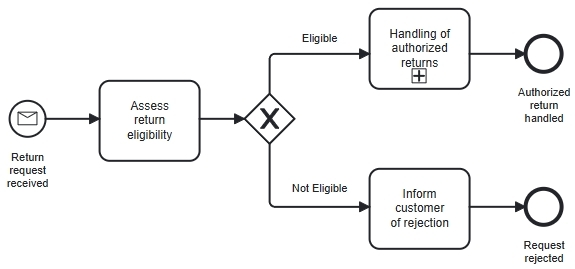 Figure 1. The BPMN Process shows where eligibility is assessed and what happens after the result is available.
The diagram makes the workflow understandable, but the Task name does not explain the policy. A reader still needs to know how eligibility is determined. That detail could initially be recorded in a procedure or attached documentation.
An Exclusive Gateway routes the Process using conditions on its outgoing Sequence Flows. Those conditions can contain expressions, so BPMN is capable of representing conditional logic. In this example, they can simply test whether the assessment result is Eligible or Not Eligible.
Specification reference: OMG BPMN 2.0.2, Section 10.6.2.
This first Process is useful even before we introduce DMN. Its level of detail is suitable for discussing the overall handling of a return.
When Business Rules Become Difficult to Maintain
Suppose we want to show the eligibility policy directly in the Process Diagram. We could replace the assessment with a series of questions:
- Was the request submitted within 30 days?
- Does the product category allow returns?
- Is the product unopened?
A failed condition leads to rejection. When all three conditions pass, the return can proceed.
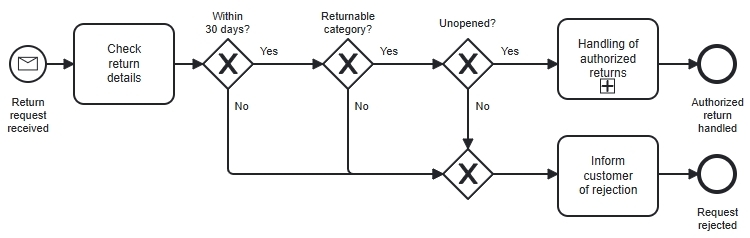 Figure 2. The same eligibility policy can be expressed through Process branches, but each additional condition adds detail to the workflow.
Three conditions are still manageable. The challenge becomes clearer when the policy grows. Perhaps some categories have different return periods, or a holiday campaign changes the deadline for certain purchases. Reviewing the policy now means following more branches and checking their combinations.
Before adding another Gateway, ask whether the new branch represents different work or simply another condition used to calculate the same result.
If a branch introduces a supervisor review, it represents a meaningful Process step. If it only checks another fact already available in the request, a Decision Model may provide a clearer place for that rule.
There is no fixed number of Gateways at which DMN becomes mandatory. The practical question is whether people can understand, test, and maintain the rules comfortably in their current form.
Modeling Return Eligibility Using DMN
We will name the Decision Determine Return Eligibility. It takes the three inputs defined earlier and returns one of two text values: Eligible or Not Eligible.
Before defining the rules, we should identify the information this Decision needs. In DMN, we can show this using a Decision Requirements Diagram (DRD).
Start With the Decision Requirements Diagram
Our DRD contains one Decision and three Input Data elements:
- Days Since Delivery: The number of days between delivery and submission of the return request.
- Returnable Category: Whether the product belongs to a category that allows returns.
- Unopened: Whether the customer reports that the product is unopened.
The Decision is represented by a rectangle. Each Input Data element is represented by a shape with rounded ends. Information Requirements, drawn as solid lines with filled arrowheads, point from the Input Data elements toward the Decision that requires them.
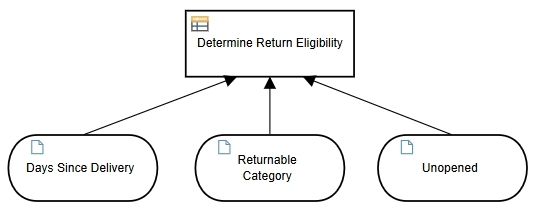 Figure 3. The DRD shows which information is required to determine return eligibility.
The DRD answers “What information does this Decision need?” It does not yet explain how that information produces an eligibility result.
These connections are dependencies, not a sequence of work. Unlike BPMN Sequence Flows, they do not describe which Activity happens next.
Define the Logic With a Decision Table
We can now describe the logic of Determine Return Eligibility using a Decision Table.
The Decision Table belongs to the Decision shown in the DRD. It uses the three inputs to determine the value of the output, Eligibility.
Each row represents a rule. A rule matches when all its input conditions are satisfied.
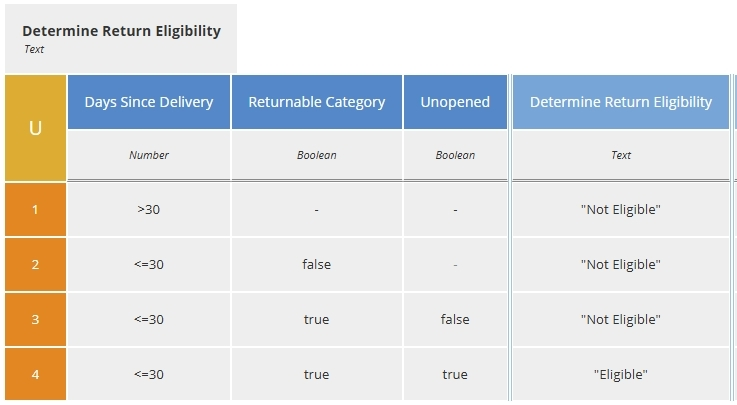 Figure 4. The Decision Table defines how the required inputs determine return eligibility.
The DRD and the Decision Table provide two complementary views of the same Decision: the DRD shows its information requirements, and the Decision Table defines its logic.
Using BPMN and DMN Together
We can now return to the original BPMN Process and make the eligibility assessment explicit as a Business Rule Task.
BPMN defines this Task type as a way for a Process to supply inputs to a business rules engine and receive results. A DMN engine can evaluate our Decision. The Process then uses the returned eligibility value to select the appropriate path.
Specification reference: OMG BPMN 2.0.2, Section 10.3.3.
////
Figure 5. The Business Rule Task evaluates the eligibility Decision. The Gateway uses its result to route the Process.
The three responsibilities are now easy to distinguish:
| Element | Responsibility in This Example |
|---|---|
| Business Rule Task | Provide the inputs and obtain the eligibility result |
| DMN Decision | Apply the return policy to determine eligibility |
| Exclusive Gateway | Continue along the path corresponding to that result |
For an executable solution, the Decision reference, input mapping, and result mapping need configuration in the chosen platform. Adding a table icon to a Task does not establish that connection by itself.
A Business Rule Task is appropriate here because we are proposing automated evaluation. If an employee makes the assessment, the Process should show the human Activity appropriately; the Decision Model can still explain the rules they use.
Changing the Policy Without Redrawing the Workflow
Suppose the retailer extends the return period from 30 to 45 days for all products covered by this simplified policy.
We update the deadline tests in all four rows and retest the boundaries, including days 45 and 46. A return submitted on day 42 may now produce a different result, but the Process still follows the same steps: assess eligibility, handle an authorized return, or inform the customer of rejection.
This separation makes the scope of the policy change easier to see. It does not remove the need to approve and deploy the change, or decide which policy version applies to existing requests. If the new policy also introduces a supervisor review, the BPMN Process will need to change as well.